Share, embed, publish, and update a video
Share a finished video with a public watch link, use eligible creator-hosting controls when shown, download an MP4, and update after revisions.
Written By Rishikesh from ngram
Last updated 12 days ago
Read before this
Check the experience you are using
The detailed controls and screenshots in this guide describe the V1 workflow. V2 (Beta) has a different composer and preview. Use the options shown in your current conversation; do not infer identical file, hosting, or social-publishing support from a V1 screenshot.
Use this when
Use this guide when you want feedback on a draft, need an MP4 download, see an unexpected watermark, or want to enable a public watch link. Creator-hosting Copy link and Embed are available only to accounts included in that rollout; sharing a reviewable draft does not mark the creative work as approved.
What this does not do
If Share shows a public watch link, it does not give the recipient editing access or automatically list the video in Made with Ngram. Publishing a link also does not remove the watermark from a Free-plan MP4 download.
Before you start
Open the exact finished conversation or editor project you intend to send. Play it once and confirm the title, thumbnail, captions, and audio. If your account has Share access and you are sharing a draft for review, tell recipients that it is a draft and preserve the project URL so you can update the same link later.
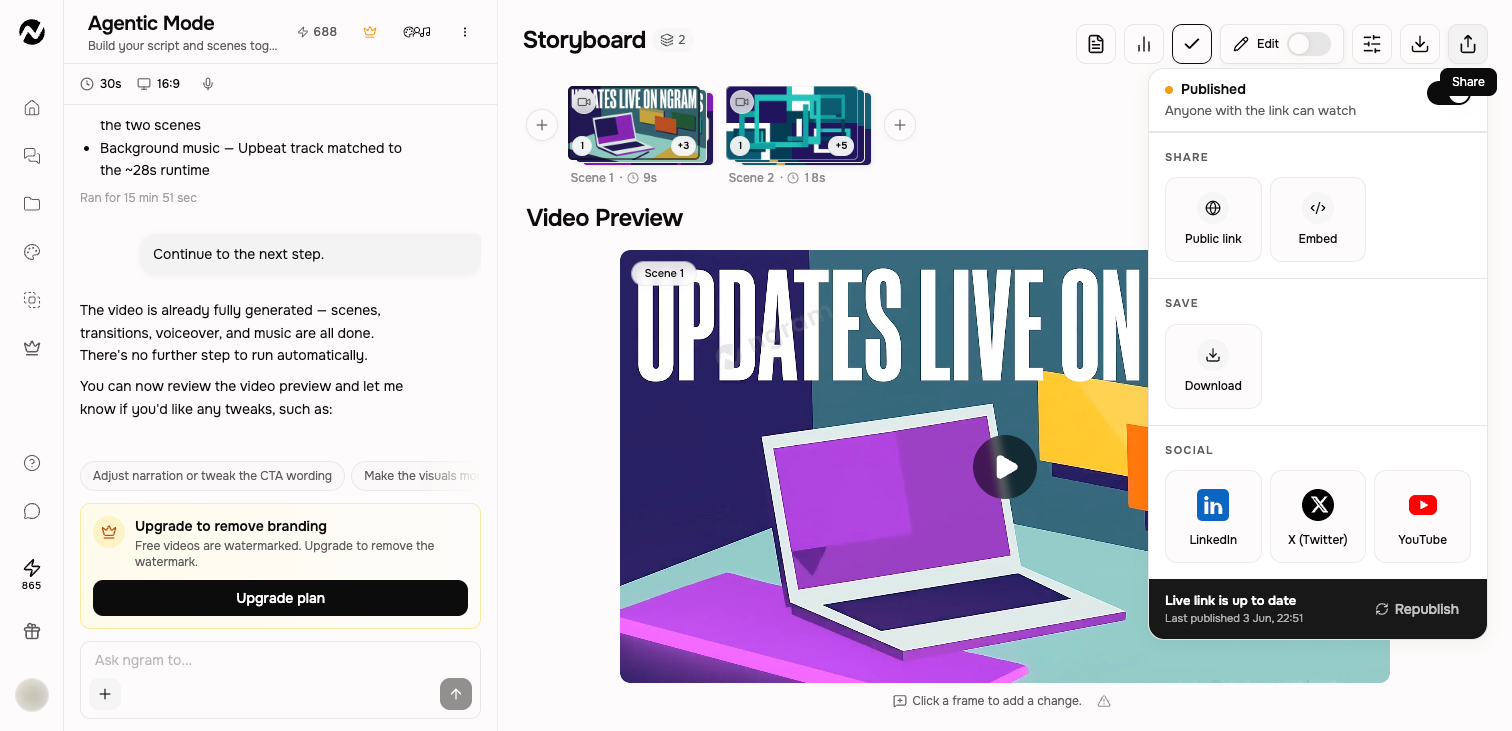
Open Share
- Open a finished conversation or editor project.
- Choose Share.
- Turn public sharing on when you want anyone with the link to watch.
- Copy the gallery/public watch link, choose Download for an MP4 or a connected social destination, and use creator-hosting Copy link or Embed only when those controls are shown.
Public link and embed
Turning public sharing on creates a gallery/public watch link for viewers. For accounts included in the creator-hosting rollout, Copy link and Embed provide the hosting-specific link and webpage embed. If those controls are absent, use the public watch link, Download, or an available social destination; do not assume creator-hosting Embed is enabled for your account.
Draft review, downloads, and watermarks
- Draft review: if Share offers a public link, send it when a reviewer only needs to play the current render. Keep editing access and the project URL private.
- Local file: choose Download when the recipient needs an MP4. Exports are unlimited and do not consume credits; the available resolution follows the current plan.
- Watermark: Free MP4 exports include the ngram watermark. Paid plans can export without it. Upgrading does not alter a file that was already downloaded, so download the current render again after paid access is active.
Republish after changes
A public watch or eligible creator-hosting link can point to an older render after you revise the project. Use the status in Share and choose Republish when it is offered and the live video is not up to date. Play the public link after republishing to confirm the intended version is live.
The gallery is curated
Public sharing does not automatically list a video in Made with Ngram. The gallery is a curated showcase controlled by Ngram. Turning public sharing off is about the direct watch link, not a self-service gallery listing switch.
What you should see
Public sharing opens a playable gallery/watch page. For an eligible creator-hosting account, Copy link and Embed provide the hosting-specific watch page and webpage embed. Download returns the current MP4 at the quality available to your plan. After Republish, reopening the relevant public link should play the revised render rather than the earlier version.
If the link, download, or published version is wrong
- Keep the project open and preserve both the project URL and destination link. Confirm that the intended render plays inside the project before changing its sharing state.
- For an older public version, open Share and choose Republish once. For an MP4 problem, use the download-and-export guide instead of starting a new generation.
- Open the public link in a separate browser tab and play it. If the same incorrect state remains, stop republishing so the working project and original link stay available for review.
Contact Support when
Contact Support when a public link does not open, one Republish still shows the wrong render, sharing will not switch on despite the displayed plan access, or the current paid-plan MP4 still has a watermark. Include the project URL, public link, plan shown in Billing, approximate time, browser, and the exact visible state. Do not send account credentials or unpublished customer media.
Before you finish
Keep the project URL and destination link together. After any material revision, check whether the public version needs an update and test it outside the editing session before sending it to an audience. Also confirm the thumbnail, title, captions, privacy state, and destination account are the ones you intend to publish.
Sharing and publishing FAQ
Can I send someone a draft video for feedback?
If your account shows a public-link control in Share, use it for the current render and send the watch link. Tell the recipient it is a draft, keep the editable project URL private, and update the same link after revisions when Republish is available.
What is the difference between a public link and a download?
Public sharing opens a gallery/watch page for viewers. Accounts included in the creator-hosting rollout also see hosting-specific Copy link and Embed controls. Download creates a local MP4 at the resolution and watermark state available to your plan.
Why does my exported video have an ngram watermark?
Free-plan MP4 exports include the ngram watermark. Paid plans can export without it. If paid access became active after an earlier download, download the current render again.
Do downloads use credits?
No. Exports are unlimited and do not consume credits. Your plan controls the available resolution and whether the MP4 carries the ngram watermark.
Why does my shared link show an older video?
Revising a project does not always update an already published public link. Open Share, choose Republish once when it is available, then reopen the public link in a separate tab to verify it.
Will a public link put my video in Made with Ngram?
No. A public-sharing link is a direct watch link. Made with Ngram is a curated showcase and is not automatically populated from public videos.
Keep going
- Connect and publish to social channels — Connect LinkedIn, X, and YouTube and distinguish available from coming-soon channels.
- Download and export a video — Download an MP4 from an agentic video or editor project at the current plan resolution.
- Revise a generated video — Choose between chat revisions, frame-specific requests, inline editing, and a full-editor copy.
Continue in ngram
Open the relevant Studio surface and follow the current controls shown in your account.
Was this helpful?
Still need help? Ask the team