Manage subscriptions, invoices, and receipts
Use Billing & Pricing to confirm your current plan, cancel or change it safely, manage a paused subscription, and download subscription or credit-pack records.
Written By Anish Muppalaneni
Last updated About 2 months ago
Read before this
Use this guide when
Use this guide when you need to cancel a subscription, verify when cancellation takes effect, change a paused plan, find an invoice or receipt, or update billing details. It explains the controls and expected state, but it cannot approve a refund or guarantee that an issued invoice will be changed.
Before you start
Open Account & Settings → Billing & Pricing and confirm the active account or team. Note the current plan, subscription status, and next billing date before making a change. Do not share full card details or account credentials with Support.
Cancel or change a subscription
- Open Billing & Pricing and read the current-plan card and next billing date.
- Select Manage plan or the visible plan-change control and review the effective date before confirming.
- To stop renewal, select Cancel subscription and complete the confirmation. Standard cancellation takes effect at the end of the current billing period; access and unused subscription credits remain available until then.
- If the subscription is paused, cancel or choose a lower plan without resuming. A downgrade applies on the next active renewal.
- Return to Billing & Pricing and verify the displayed plan, subscription status, and effective date.
Find an invoice or receipt
- Select Invoices on Billing & Pricing.
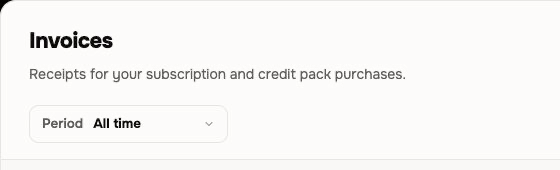
- Use the period filter to find a subscription or credit-pack transaction.
- Select Download PDF for a local copy or View invoice for the hosted record. Select View all in Stripe when you need the complete billing history.
- Confirm the date, amount, and billing identity before using the record.
Change billing details
Open Billing & Pricing, select Manage plan, then use Billing information → Update information in the Stripe customer portal. Save the available billing details before the next charge so they apply to future invoices. Existing invoices remain unchanged by default. Support can review a request about an older invoice, but a corrected or reissued document is not guaranteed.
If the expected state does not appear
Refresh Billing & Pricing once and confirm the active account or team. Do not repeat a purchase, cancellation, or plan change. Contact Support when the status, effective date, invoice, or receipt is still missing; include the approximate time, visible status, and invoice or receipt reference without sending payment secrets.
Subscription and invoice FAQ
How do I cancel my subscription, and when does it end?
Open Account & Settings → Billing & Pricing, select Cancel subscription, and complete the confirmation. Standard cancellation takes effect at the end of the current billing period, with access and unused subscription credits available until then.
Can I cancel or downgrade while my subscription is paused?
Yes. Use Billing & Pricing to cancel or choose a lower plan without resuming. A downgrade applies on the next active renewal. Verify the displayed status and effective date afterward.
Where can I download an invoice or receipt?
Open Billing & Pricing → Invoices. Use the period filter, then select Download PDF or View invoice. The list includes subscription and credit-pack records.
Can I change the company, address, or tax details on an issued invoice?
Open Billing & Pricing → Manage plan, then select Billing information → Update information in Stripe. Changes apply to future invoices. Existing invoices remain unchanged by default; Support may review an older-invoice request, but correction or reissue is not guaranteed.
Why is an invoice or subscription change missing?
Confirm the active account or team and refresh Billing & Pricing once. Do not repeat the action. If it remains missing, contact Support with the time and visible status or transaction reference.
Keep going
- Understand plans and pricing — Compare plans, credit allowances, video capacity, rollover, and top-up rules.
- Understand credits — Understand estimates, reservations, charges, plan grants, top-ups, and balance recovery.
- Review your usage history — Trace credit events to the related project or operation before requesting a review.
- Request a billing review or refund — Prepare a complete request without assuming that a refund or credit adjustment is guaranteed.
- Use Help and contact Support — Choose self-serve guidance or direct assistance and share privacy-safe diagnostics.
Review your billing state
Open Billing & Pricing, make one intended change, and verify the resulting status before leaving the page.
Was this helpful?
Still need help? Ask the team