Choose how to automate ngram and connect integrations
Choose the available API, MCP, workflow, browser, or publishing path for your job, connect it from Integrations, and verify one safe test before scaling it. To generate videos through your own application, choose the REST API path.
Written By Rishikesh from ngram
Last updated 4 days ago
Read before this
Use this when
Use this guide when you want to automate video creation, connect ngram to another app, publish without a manual download, or check whether an API or connector is available. It also explains why a card marked Coming Soon cannot be configured yet.
What this does not do
This guide does not activate a Coming Soon connector, remove the authentication rules of another service, or guarantee that a third-party account has permission to use every action. Use the live card and its setup screen as the availability check.
Before you start
Sign in to the ngram account that should own generated projects. Choose a small test input with no secrets or customer information, and make sure you can manage the destination account or the automation service's credentials. Open Settings → Integrations to compare the actions currently shown.
Choose the access path
REST API, Zapier, n8n, and MCP clients using an API key: Video creation with an API key requires Basic or a higher paid plan and enough credits. Creating a key is self-service, but a key alone does not make a Free account eligible to generate videos through the API.
Supported connected-app sign-in, the GitHub app, and the Notion integration can create on Free with available credits and the Free model and premium-video limits. Their Free video files include an ngram watermark. Ordinary downloads from Studio require Basic or higher.
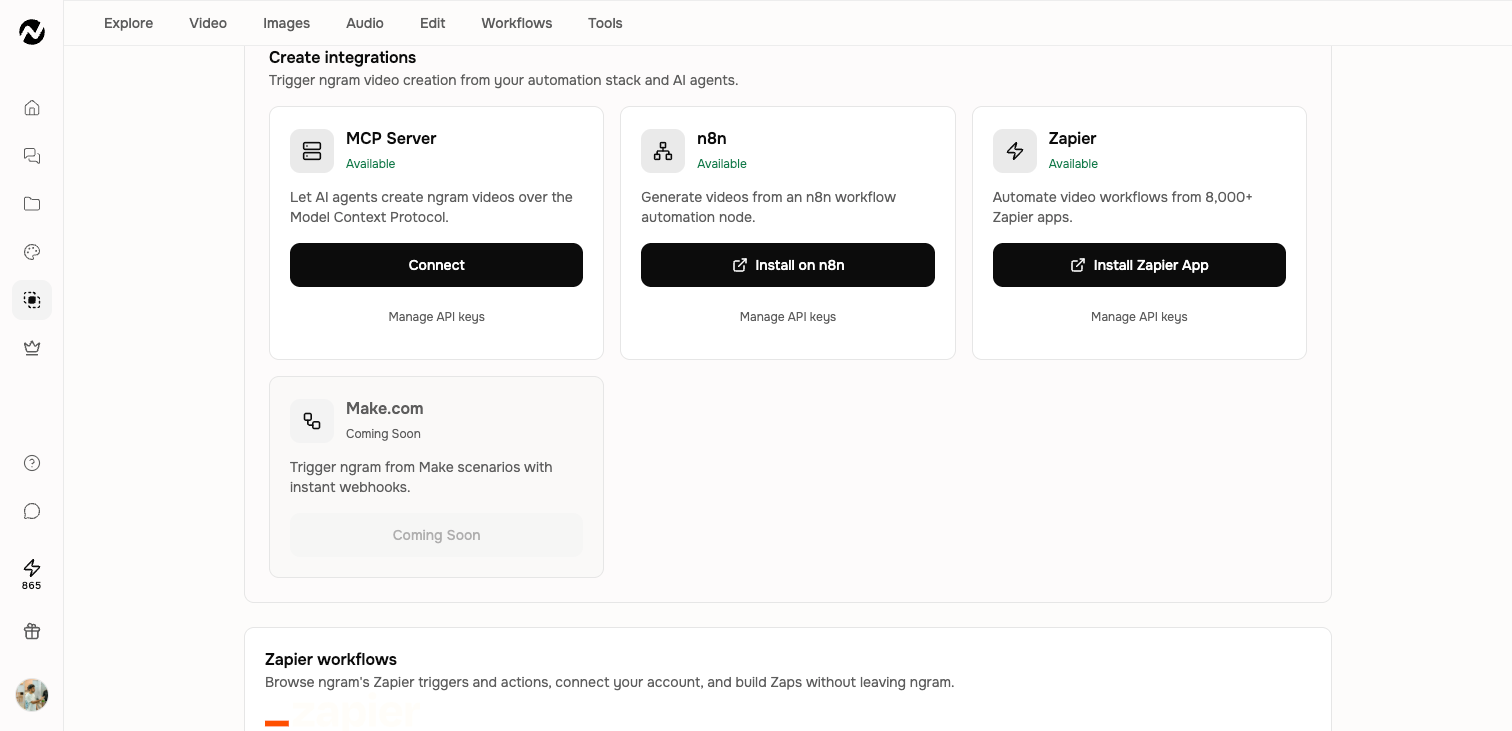
Integration groups
- Chrome extension: turn a webpage into a Studio video workflow.
- Publish integrations: LinkedIn, X, and YouTube connections.
- Create integrations: MCP, n8n, Zapier, and viaSocket entry points for starting work from another system.
- Make.com: currently shown as Coming Soon in the deployed UI.
Authentication access
Every signed-in user can create and manage credentials from Settings → API Keys. Some connectors, including supported Claude and ChatGPT flows, complete authentication inside the connector instead; follow the setup screen for the surface you are connecting.
Choose the right automation path
- API and webhooks: use the REST API for a custom integration. Every signed-in user can manage a bearer key, and public webhook events report video.completed or video.failed.
- MCP: let a compatible AI assistant call ngram account, catalog, video, and image tools. Authentication depends on the client.
- Zapier, n8n, and viaSocket: build workflow automations without maintaining a direct REST integration. Use the connector's current actions and authentication screen.
- Chrome extension: start a video workflow from the webpage you are viewing.
- LinkedIn, X, and YouTube: connect a destination for beta social publishing. Use the social-publishing guide for permission and publish checks.
Before connecting an automation
- Confirm that the card has a live Connect, install, or setup action rather than a Coming Soon label.
- Choose a small test input that contains no secrets or customer data.
- Complete one creation and retrieve the result before building a larger workflow.
- Record which account owns the connection and where the generated project is saved.
- Keep API keys and access tokens in the automation service's secret store, never in a prompt or shared screenshot.
Developer documentation
Use the API credentials, API getting-started, MCP, Zapier, and n8n guides in the Automations and developer category. API-key creation is self-service for every signed-in user; the availability and permissions of third-party connectors still depend on the connector and its current setup flow.
Connect and verify one test
- Open Settings → Integrations and confirm that the card has a Connect, install, or setup action rather than Coming Soon.
- Open the card's setup path. Connect a test account or store a self-service API credential in the integration's secure credential field.
- Run one minimal creation, then retrieve its status and completed result before expanding the workflow.
- Open Projects in the same ngram account and confirm that the test job and result are saved there. Record connection ownership and failure handling before using customer data or production volume.
What you should see
A successful connection shows the account or credential state expected by that integration. A successful creation returns a job or result and saves the generated work to the ngram account that owns the connection. Coming Soon cards do not provide a usable connection and should not be treated as active integrations.
If the connection or test fails
- Preserve the test input, job identifier, and visible error. Confirm the card is available and that you are signed in to the account that owns the connection.
- Review the connector's authentication, destination permissions, required fields, and ngram credit balance. Do not expose a token while copying an error.
- Reconnect or reauthorize the same integration once, then repeat the minimal test once. Do not scale the automation or keep starting jobs while ownership or status is uncertain.
Contact Support when
Contact Support when an available card cannot connect, one reauthorization does not restore access, a test job has no final state, or the result belongs to the wrong ngram account. Include the integration name, account or workspace, approximate time, job identifier, and sanitized error. Never send a bearer key, token, authorization header, or customer source data.
Integrations and automation FAQ
Can I generate videos through an API or automate ngram video creation?
Yes. Use the REST API and webhooks for a custom build, MCP for a compatible AI assistant, or Zapier, n8n, or viaSocket for a workflow connector. Start with one small test.
Can every signed-in user create an API key?
Yes. Open Settings → API Keys to create, copy, rotate, or revoke a bearer key. Store it only in the integration's secure credential field.
Which no-code automation integrations are available?
Use the live cards for Zapier, n8n, or viaSocket when they show a Connect, install, or setup action. A card marked Coming Soon is not available yet. Test one minimal workflow before using production volume.
Which integrations can publish a finished video?
LinkedIn, X, and YouTube are currently available as beta publish destinations. Connect them from Integrations and verify every post on the destination platform.
Why can't I connect a card marked Coming Soon?
Coming Soon means there is no active self-serve connection yet. Do not enter credentials or build a workflow around that card until it shows a live Connect, install, or setup action.
Where does an automated video appear?
It is saved to the ngram account that owns the connection. Open Projects in that same account or team context and check Agent chats or the relevant result view.
What should I test before running an automation at scale?
Use a non-sensitive input, create one job, retrieve its final status and result, and confirm where the project was saved. Define failure handling before adding customer data or production volume.
Keep going
- Connect and publish to social channels — Connect LinkedIn, X, and YouTube and distinguish available from coming-soon channels.
- API getting started — Continue with the developer-platform guide.
- MCP server — Continue with the developer-platform guide.
- Zapier — Continue with the developer-platform guide.
- n8n — Continue with the developer-platform guide.
Continue in ngram
Open the relevant Studio surface and follow the current controls shown in your account.
Was this helpful?
Still need help? Ask the team