Use Help and contact Support
Choose video revisions, Give feedback, or Support. Share a useful rating or a reproducible product problem with the details ngram needs.
Written By Anish Muppalaneni
Last updated 9 days ago
Read before this
No earlier help article is required. You can start here.
Use this guide to tell ngram how a video turned out or get help with a blocked task. A video revision, a result rating, and a support request have different outcomes.
Choose the right place for your feedback
- Change the video: use chat or Make changes in its conversation. During plan review, use Request changes.
- Rate a V2 result: choose Give feedback below the preview. A rating tells ngram about the experience; it does not regenerate the video.
- Report a broken control, missing result, account issue, or unexpected credit event: use Support when available, or the contact form.
Before you send feedback
Sign in and open the relevant conversation from Projects. Watch the selected version first. For a technical problem, note the last action, the exact error, and the approximate time. You do not need to generate another video just to report the problem.
Rate a V2 video with Give feedback
- Open the completed V2 conversation and review the selected preview.
- Choose Give feedback below the preview.
- Select the rating that matches your experience.
- Optionally describe the main reason in What would make this better? (optional). Name a scene or moment and explain the effect on the viewer.
- Choose Submit once and wait for the acknowledgement. Use Skip or Dismiss feedback if you do not want to send it.
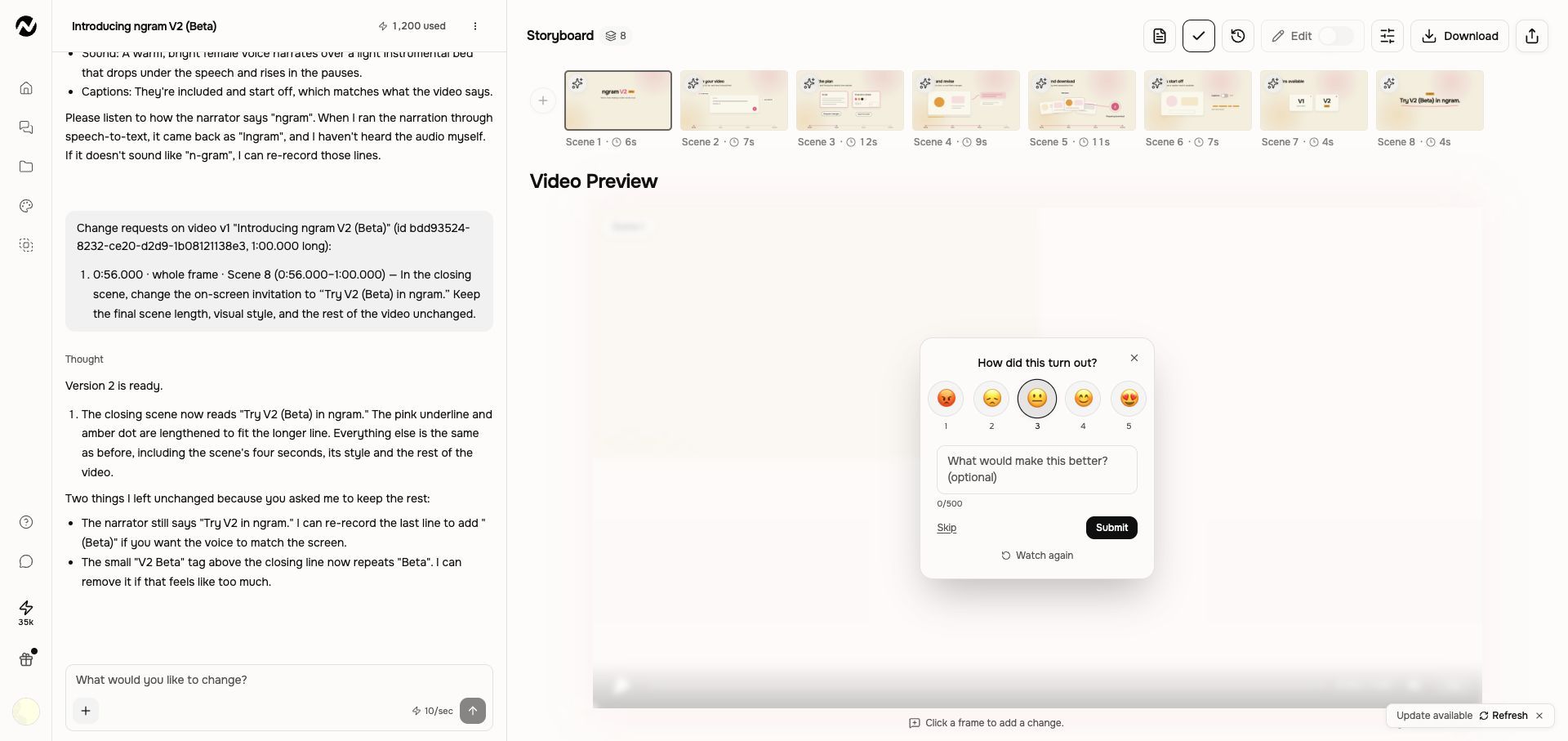
The form shows a short comment limit. A successful submission acknowledges your feedback; it does not create a revised video or a support conversation. If you have already submitted feedback for that video, follow the message shown rather than retrying.
Write feedback the team can use
For a result rating, describe what worked or failed and where: “The opening makes the problem clear, but the receiving labels around the middle disappear before I can read them. Longer holds would make the steps easier to follow.” This is a teaching example, not feedback from a customer.
For a product problem, use: “I was trying to [task]. In [V1/V2 and page], I did [steps]. I expected [result], but saw [actual result or exact error]. It happened at [time and timezone]. My project is [URL]. I tried [one recovery action], and [outcome].”
If feedback will not submit
If the form shows an error, keep your comment, check the connection, and retry once. If it still fails or the task itself is blocked, use Support or the contact form with the details below. Sending a rating is not a request for an immediate reply.
Help and Support are different
- Help opens self-serve documentation for learning a workflow or checking expected behavior.
- Support opens the in-product support conversation for a specific problem when that integration is enabled for your account.
- Use the Usage page for a credit event before reporting an unexpected charge.
- Use the destination social platform as well as ngram Support when an external account or permission is involved.
Check these first
- Reopen the exact conversation, editor copy, or Tool result from Projects.
- Read the latest visible status and use any retry or recovery action once.
- Confirm the active account or team, current credit balance, and plan message.
- Copy the project URL and note the approximate time and last action.
- Open Support from the Studio navigation when it is available and describe the smallest reproducible problem. Otherwise open the ngram contact form and choose Technical Support.
What to include
- Project or conversation URL
- Tool or page name
- Approximate time and timezone
- Last visible status or exact on-screen error
- Browser and whether one retry was attempted
- For billing, the Usage activity description and credit amount, plus a non-sensitive invoice or receipt reference when relevant
What not to send
Never send a password, API key, access token, full payment-card number, or unrelated private source material. Describe the input type and duration first. Share sensitive files only if Support requests them through an approved secure path and you have permission to do so.
For a result that merely missed the brief
A valid but disappointing creative result is usually faster to repair with a targeted revision than a support ticket. Use the prompt troubleshooting guide to identify the first mismatch. Contact Support when a product failure, missing output, credit issue, or reproducible control problem prevents that revision. Billing and credit outcomes are reviewed case by case; sending a complete request does not guarantee a refund or credit restoration.
Help and Support FAQ
When should I stop troubleshooting and contact Support?
Stop after one safe recovery attempt when work remains stuck, a completed output is missing, an editor control repeatedly fails, or credits may be affected. Preserve the project and send the smallest reproducible problem.
What information helps Support investigate faster?
Include the project or conversation URL, page or Tool name, approximate time and timezone, visible status or error, browser, whether one retry was attempted, and any related Usage description and amount.
What should I never include in a support request?
Never send passwords, API keys, access tokens, full payment-card numbers, or unrelated private source material. Share sensitive files only through an approved path when Support requests them and you have permission.
Keep going
- Understand generation status, retries, and recovery — Troubleshoot slow, stopped, failed, or disconnected video generation without relying on fixed time promises.
- Fix a prompt that missed the brief — Diagnose a weak result and improve the prompt, sources, storyboard, or targeted revision.
- Review your usage history — Use the current Usage page to understand credit activity and investigate unexpected charges.
- Manage your account and preferences — Use current Account, Preferences, Billing, Usage, Integrations, Voice, and Faces settings.
- Manage subscriptions, invoices, and receipts — Cancel or change a plan, manage a paused subscription, and download billing records.
- Revise a generated video — Use feedback as an instruction to change the video itself.
Contact ngram Support
Use in-product Support when it is visible, or choose Technical Support in the contact form.
Was this helpful?
Still need help? Ask the team